# TC Link
[](https://eurikon.github.io/TC-Link/) [](https://eurikon.github.io/TC-Link/CHANGELOG.html)
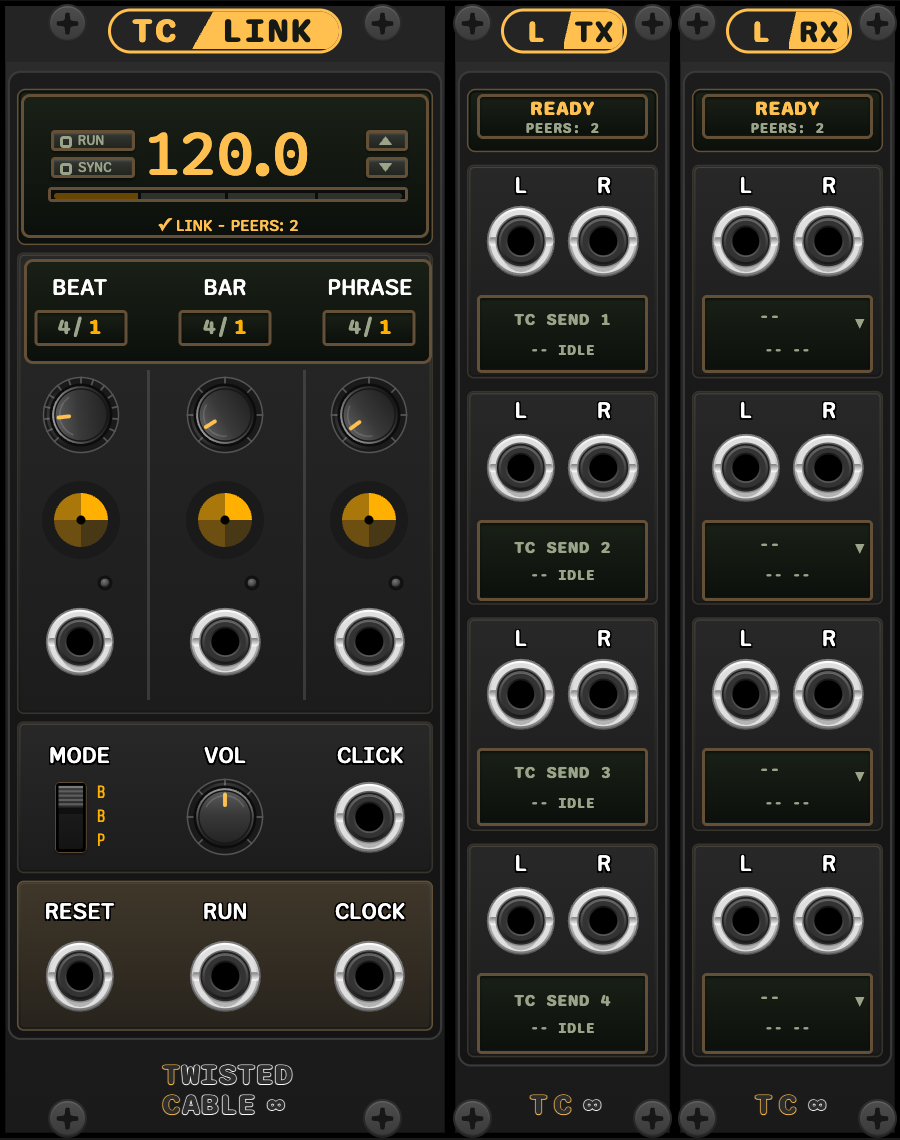 *TC LINK · 10 HP / L TX · 5 HP / L RX · 5 HP. Panel illustrations in the Default theme.*
Ableton Link 4 timing, transport and Link Audio integration for VCV Rack 2.
TC Link connects Rack to a shared Link session while providing integrated
beat, bar and phrase timing. It provides a Link-synced clock and transport
core together with companion modules for sending and receiving network audio.
---
## Modules
| Module | HP | Description |
|--------|----|-------------|
| TC LINK | 10 | Link tempo, phase and transport core with beat/bar/phrase structure, selectable PPQN clock, reset, run and click outputs |
| L TX | 5 | Four-lane mono/stereo Link Audio sender with editable channel names |
| L RX | 5 | Four-lane Link Audio receiver with channel selection and stereo outputs |
The companion panel titles are `L TX` and `L RX`; Rack’s module browser
lists them as **TC Link Send** and **TC Link Receive**.
---
The seven themes are Default, Copper, Glacier, Moss, Amethyst, Medi and Brit.
Choose a theme from the active TC LINK’s context menu; send/receive modules
follow that choice. Without a core, each companion offers its own Theme
selector and retains its saved local choice.
The TC logo retains its fixed branding colours.
## TC LINK
TC LINK joins an Ableton Link session and converts its shared timeline into
Rack timing and transport signals.
- Shared Link tempo, phase and optional Start/Stop Sync
- Tempo entry from the panel or any connected Link application
- Four-segment quantum phase display and peer count
- Beat, bar and phrase counters, radars and trigger outputs
- Selectable 1–96 PPQN clock (1 PPQN default), reset trigger and run gate
- Beat, bar or phrase metronome click
- Local operation when no other Link peer is present
- One active core per patch with automatic promotion of the oldest standby
core
[TC LINK user manual](docs/TC-Link_manual.md)
---
## L TX
L TX publishes Rack audio as Link Audio channels.
- Four independent send lanes
- Mono or stereo operation per lane
- Editable channel names
- Automatic `TC SEND #` numbering across multiple modules
- ±5 V Rack audio mapped to Link Audio PCM
[L TX user manual](docs/TC-Link-Send_manual.md)
---
## L RX
L RX subscribes to Link Audio channels and converts them to Rack audio.
- Four independent receive lanes
- Channel selection from the lane displays
- Mono duplication to both outputs and native stereo output
- Channel-loss detection and automatic recovery
- Unique channel assignments across multiple receive modules
[L RX user manual](docs/TC-Link-Receive_manual.md)
---
## Requirements
- VCV Rack 2
- Local-network permission for Rack and other Link applications
- A Link Audio-capable application for L TX and L RX
Link timing works with standard Ableton Link applications. Network audio
requires Link Audio support in the sending or receiving application.
---
## Start here
Install or update TC Link through your VCV Library account. Add **TC Link**
from Rack’s module browser for timing; add **TC Link Send** or
**TC Link Receive** for network audio. Send and receive modules also work
without a TC LINK core.
- **Sync a sequencer:** patch TC LINK’s CLOCK, RUN and RESET to its transport
inputs. Match the sequencer’s expected clock resolution.
- **Send a synth or drum bus:** connect it to L TX, then subscribe to its
named channel in the receiving Link Audio application.
- **Bring a remote instrument into Rack:** select its channel on L RX and
patch the lane outputs to a mixer.
Senders and receivers may sit anywhere in the patch and work without a core.
All TC Link modules in the Rack instance share one Link participant. Adding or
removing TC LINK keeps existing audio connections; it supplies timing controls
and outputs when needed.
---
## Signal specifications
- Link integration: Ableton Link 4.1.1
- Clock output: selectable 1, 2, 4, 8, 12, 24, 48 or 96 PPQN; 1 PPQN default; 10 V pulses, up to 1 ms and capped at half the clock period
- Trigger outputs: 10 V, 1 ms
- Run output: 10 V gate
- Rack audio range: ±5 V
- Link Audio lanes: four per L TX or L RX module
- Network audio formats: mono and stereo
Link Audio uses buffering and adds latency. Performance depends on the
network, audio hardware, driver configuration and host buffer settings.
---
## License
TC Link is a commercial proprietary plugin sold through the VCV Library,
licensed under the standard [VCV End User License Agreement](https://vcvrack.com/eula).
See the [copyright notice](COPYRIGHT.md), [LICENSE.md](LICENSE.md) and
[ATTRIBUTION.md](ATTRIBUTION.md).
Licence ownership and permitted installations follow VCV’s EULA.
TC Link uses Ableton Link. Ableton, Link and Ableton Live are trademarks of
Ableton AG. TC Link is an independent Twisted Cable product and is not
affiliated with or endorsed by Ableton AG.
---
**Version:** 2.0.2
**Author:** Latif Karoumi
**Copyright 2026 Twisted Cable**